 HoeWars
Scoreboard and Tab
What the in-game scoreboard and tab list show, and how to change them.
HoeWars draws a sidebar scoreboard and a tab list header and footer for every player. Both have two states: a queue state before a match and a started state during one. Everything is configured in plugins/HoeWars/scoreboard.yml, using the same legacy & color codes as the rest of the plugin.
Placeholders in curly braces, such as {time_remaining} or {player_percentage}, are filled in live by the plugin. They are not the same as PlaceholderAPI placeholders; see Placeholders for those.
Sidebar scoreboard
The sidebar updates on a timer set by update-interval (in ticks).
Queue state
Shown while waiting in queue. By default it lists the mode, the arena, the current and needed player counts, and the estimated wait.
scoreboard:
  queue:
    title: "&6&lHoeWars"
    lines:
      - ""
      - "&fMode: &e{mode}"
      - "&fArena: &e{arena}"
      - ""
      - "&fPlayers: &a{players}&7/&a{max_players}"
      - "&fNeeded: &e{players_needed}"
      - "&fWait: &e{estimated_wait}"
      - ""
      - "&6play.yourserver.com"
Started state
Shown during a match. By default it shows the arena, mode, time remaining, your block count and floor share, your placement, and the current leader.
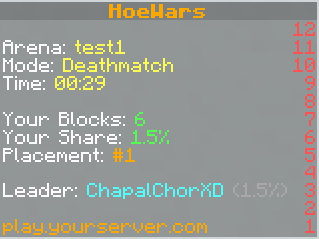
scoreboard:
  started:
    title: "&6&lHoeWars"
    lines:
      - ""
      - "&fArena: &e{arena}"
      - "&fMode: &e{mode}"
      - "&fTime: &e{time_remaining}"
      - ""
      - "&fYour Blocks: &a{player_blocks}"
      - "&fYour Share: &a{player_percentage}%"
      - "&fPlacement: &6#{player_position}"
      - ""
      - "&fLeader: &b{top_1_name} &7({top_1_percentage}%)"
      - ""
      - "&6play.yourserver.com"
Tab list
The tab list has a header and footer for each state, plus a player-format that styles each name in the list. The started format uses {player_color} so each player shows in their assigned team color.
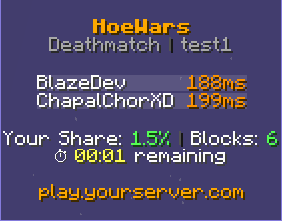
tab:
  started:
    header:
      - ""
      - "&6&lHoeWars"
      - "&7{mode} &8| &7{arena}"
      - ""
    footer:
      - ""
      - "&fYour Share: &a{player_percentage}% &8| &fBlocks: &a{player_blocks}"
      - "&f⏱ &e{time_remaining} &fremaining"
      - ""
      - "&6play.yourserver.com"
      - ""
    player-format: "{player_color}{player}"
Placeholders
These are the tokens you can use in the scoreboard and tab lines.
| Placeholder | Meaning |
|---|---|
{mode} | The match mode |
{arena} | The arena name |
{players} / {max_players} | Current and maximum players |
{players_needed} | Players still needed to start |
{estimated_wait} | Estimated wait time in queue |
{time_remaining} | Time left in the match |
{player_blocks} | Your claimed block count |
{player_percentage} | Your share of the floor, as a percentage |
{player_position} | Your current placement |
{player_color} | Your assigned team color (tab player-format only) |
{top_1_name} / {top_1_percentage} | The current leader and their share |
Turning it off
Set enabled: false under scoreboard or tab to disable either feature. Run /hoe reload after editing.