 Ascend
The HUD
The action-bar HUD shows your abilities, levels, and live cooldowns, with three icon styles from plain text to full custom icons.
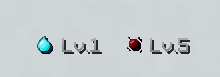
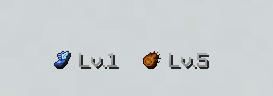
The HUD is the bar just above your hotbar (the action bar). It shows your equipped secondary and primary, each with its level. While an ability recharges, its side of the bar turns into a live cooldown countdown. When an ability levels up, a golden star flashes on the bar.
Players can hide or show their own bar at any time:
/ascend hud toggle
The same toggle is a button in the ability menu. See Commands for permissions.
Display settings
These live in the hud block of config.yml:
| Setting | What it does |
|---|---|
mode | persistent keeps the bar on screen at all times. on-change only shows it briefly after an activation or level-up. |
on-change-seconds | In on-change mode, how many seconds the bar stays up after an activation or level-up. |
refresh-ticks | How often the bar is refreshed, in server ticks (20 ticks is 1 second). |
icon-mode | The icon style: TEXT, VANILLA, or ITEMSADDER (see below). |
Change a value, then apply it live with /ascend reload.
Icon styles
hud.icon-mode picks how each ability is drawn on the bar:
| Mode | Needs | What you see |
|---|---|---|
TEXT | Nothing (default) | The ability's name, greyed out while it cools down. |
VANILLA | A resource pack you build | Custom picture icons from your pack's font. |
ITEMSADDER | The ItemsAdder plugin | Icons supplied by ItemsAdder. |
Here is what the bar looks like with custom icons set up:
The official icon pack
The icons shown in the screenshots across this wiki are the SMP Ability Icons Pack, a paid addon with 30 HUD glyphs (a ready and cooldown icon for every ability, plus the utility glyphs):
Get the SMP Ability Icons Pack on BuiltByBit
It currently ships for ItemsAdder only: install it, set hud.icon-mode: ITEMSADDER, and you are done, no pack building needed.
Need the icons for another setup, like Nexo or a plain resource pack? Contact us on Discord and we will sort you out.
TEXT
The default. No resource pack, no setup, works everywhere. The bar shows ability names, and a name is greyed out while that ability is cooling down.
VANILLA
Custom glyph icons from a resource pack you build and give to your players. The plugin does the hard part for you: on first run it writes a starter template to plugins/AscendSMP/resourcepack-reference/font-default.json. It lists a font entry for every ability's ready and cooldown icon, plus the empty-slot and level-up glyphs, each mapped to its own character.
To set it up:
- Create a resource pack and add a font at
assets/minecraft/font/default.json, using the generated template as your starting point. - Supply the referenced PNG textures under the pack's
textures/font/path. - Make sure each glyph's character matches the matching entry in
glyphs.yml(the characters are fully remappable if your pack uses a different layout). - Ship the pack to your players, set
hud.icon-mode: VANILLA, and run/ascend reload.
ITEMSADDER
If your server runs the ItemsAdder plugin, it can supply the icons instead. Configure the itemsadder keys in glyphs.yml to point at your ItemsAdder font. If ItemsAdder is missing or those keys are not set up, the plugin quietly falls back to TEXT, so nothing breaks.
Not sure which mode to use? Stay on TEXT. The plugin is fully playable with it, and you can switch to custom icons later without losing anything.
Stuck building a pack, or icons not showing? Ask on our Discord: https://discord.arrowtan.cc