
Defining wands
Every key in wands.yml, what the item block controls, and how to add your own wand variants.
wands.yml is where the wands themselves are defined. Each entry under wands: is one wand id, and you can have as many as you like.
wands:
  seller:      # <- the wand id
    type: sell
    ...
  builder:
    type: build-inventory
    ...
The id is what you type in /wandworks give, what shows in /wandworks list, and what the default permission is built from. Keep it lowercase and without spaces.
Adding a wand
Copy an existing block
Copy one of the three shipped entries, top to bottom, and paste it under wands:.
Change the id
The first line of the block. It has to be unique in the file.
Change the permission
Set permission to something matching the new id, and give it to the ranks that should have it.
Reload
/wandworks reload, then /wandworks list to check it loaded.
A wand entry with an unknown type, no item section, or a material that is not a real item is skipped with a console warning naming the id. The rest of the file still loads. If a wand goes missing, that warning says why.
The item block
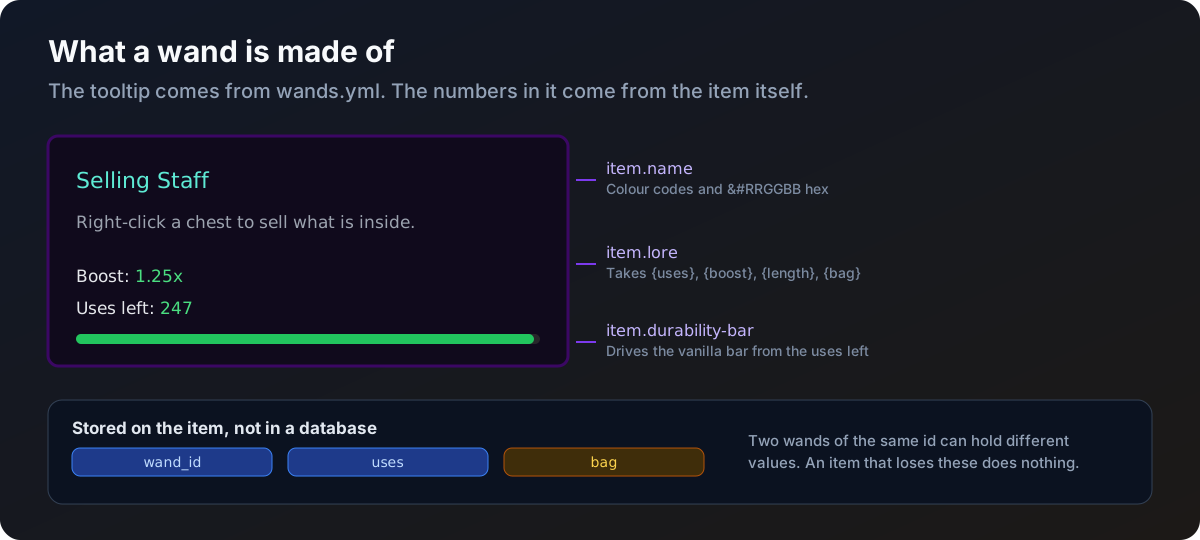
item:
  material: BLAZE_ROD
  name: "&aSelling Staff"
  custom-model-data: 1001
  glow: true
  durability-bar: false
  flags:
    - HIDE_ATTRIBUTES
    - HIDE_ENCHANTS
  lore:
    - "&7Right-click a chest to sell what is inside."
    - ""
    - "&fBoost: &a{boost}x"
- "&fUses left: &a{uses}"| Key | What it does | Default |
|---|---|---|
material | The Bukkit material. Has to be something that exists as an item | required |
name | Display name, colour codes allowed | the wand id |
custom-model-data | For resource pack models. Leave it out to set nothing | not set |
glow | Enchantment shimmer without an enchantment | false |
durability-bar | Drives the vanilla durability bar from the uses left | false |
flags | Tooltip parts to hide. Bukkit ItemFlag names | empty |
lore | The tooltip lines under the name | empty |
durability-bar needs the wand to have uses above zero, since it needs something to measure against. An empty line in lore is a blank row in the tooltip, which is the usual way to break the block up.
Lore placeholders
| Placeholder | Prints |
|---|---|
{uses} | Uses left on this particular wand |
{boost} | The wand's boost, trimmed. 1.25 rather than 1.2500 |
{length} | The wand's line length |
{bag} | Whether bag use is on, in the player's language |
On a server with no InfiniteBags, every lore line containing {bag} is dropped from the item rather than printed as "off".
Colours
Legacy ampersand codes plus &#RRGGBB for hex, which works everywhere colour does, name and lore alike.
name: "c5cffWand&#a78bfaWorks"Uses
uses: 250
uses-per-action: 1
uses-mode: per-click
on-empty: break| Key | What it does | Default |
|---|---|---|
uses | Uses a fresh wand starts with | 0 |
uses-per-action | Uses one action costs | 1 |
uses-mode | Builder wands only. per-click or per-block | per-click |
on-empty | break removes the wand with a sound, keep leaves it there doing nothing | break |
A negative number in any of these is read as zero. length is the exception and is raised to 1.
uses-per-action: 0 on a wand with uses above zero gives you a wand that never runs down. The uses row in the lore just sits at its starting number.
Type specific keys
| Key | What it does | Default |
|---|---|---|
boost | Multiplies the priced total of a sale | 1.0 |
minimum-value | Sales worth less than this are refused | 0.0 |
maximum-value | Payout cap. 0 turns the cap off | 0.0 |
show-item-count | Puts the item count in the sale message | true |
show-boost | Puts the boost in the sale message | true |
Full behaviour on Sell wand.
Keys from the other type are read and then ignored, so leaving them in a copied block does no harm. It is just noise.
Shared keys
permission: wandworks.use.seller
cooldown: 3
sound: ENTITY_EXPERIENCE_ORB_PICKUP
whitelist: []
blacklist:
- BEDROCK| Key | What it does | Default |
|---|---|---|
permission | Node needed to use this wand | wandworks.use.<id> |
cooldown | Seconds between uses, per player, per wand | 0 |
sound | Played on a successful action. Leave it out for silence | none |
whitelist | Only these materials. Empty means everything | empty |
blacklist | Never these materials. Beats the whitelist | empty |
What the lists apply to
The same two lists mean different things per type.
| Type | The lists filter |
|---|---|
sell | Each item inside the container |
build-inventory, build-shop | The block that was clicked |
An unknown material name in either list gets a console warning naming the wand and the entry, and is skipped.
Sounds
Both styles are accepted, so write whichever you have to hand:
sound: ENTITY_EXPERIENCE_ORB_PICKUP
# or
sound: entity.experience_orb.pickup
An unknown sound gets a console warning and the wand plays nothing.
The three shipped wands
BLAZE_ROD, 250 uses, boost: 1.25, a 3 second cooldown and a minimum sale of 1.0. Bedrock blacklisted.
BREEZE_ROD, 250 uses, 5 blocks a click, one use per click, no cooldown. Bedrock blacklisted.
The same as builder but type: build-shop, so the blocks are bought instead of taken. Different model data and name so the two are told apart.
Treat them as worked examples. Edit them, rename them, or delete them once you have your own.
What lives on the item
Three values are written into the wand item itself, not into a database:
| Value | What it is |
|---|---|
wand_id | Which entry in wands.yml this is |
uses | Uses left on this particular wand |
bag | Whether bag use is on |
Two wands of the same id can therefore hold different values, and giving a wand away gives its state away with it. An item that loses these is a normal item again and does nothing.