Commands
TradeSMP has two commands: /trade for admins, and /tradesmp for everything else.
Quick table
| Command | What it does | Permission |
|---|---|---|
/tradesmp level [player] | Show your own or another player’s level and active effects. | tradesmp.use (everyone) |
/tradesmp locate village | Find the nearest village. Needs Trade Level +3. | Gated by level, no node |
/tradesmp reload | Reload the config and language files. | tradesmp.admin.reload (op) |
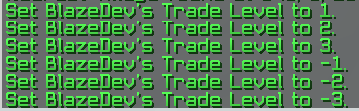
/trade <player> <level> | Set a player’s level directly, -3 to 3. | tradesmp.admin.set (op) |
Details
/tradesmp level [player]Shows a Trade Level and a one line summary of what that level does in game. Leave off the name to see your own. Add a name to see someone else’s. Any player can use this.
/tradesmp locate villageFinds the nearest village, prints its coordinates and distance, then starts a cooldown. Only works while your stored level is
+3. Full details on Village Locator.
/tradesmp reloadReloads
config.ymland the language files without a restart. Note: this does not rebuild the database connection, so a storage change still needs a full restart. See Storage.
/trade <player> <level>Sets a player’s level to any whole number from
-3to3. Out of range input is rejected with a message. Works on online players only.
Reset a player
To wipe someone’s progress, set them back to neutral with
/trade <player> 0.
Previews
The /tradesmp help output:

/tradesmp level:

/trade:
See Permissions for the full node list.
Nav